⚡ Built for TradeLocker · Powered by Rust · Designed by Traders

Copy TradeLocker trades
with zero headaches

A self-healing Rust engine that copies across different TradeLocker servers (including native Trailing Stop Losses), fires all slaves simultaneously in burst mode, and records every trade in an extensive History tab with highly detailed analytics — equity curves, Sharpe ratio, slippage breakdowns, calendar heatmaps, and CSV export.

Card required · 7-day full access · Cancel anytime

< 1 msCopy latency
20+Analytics metrics
Cross-ServerSymbol translation
24/7Self-healing
Capabilities

Built for real-world trading

Every feature engineered for speed, reliability, and total control with nothing you don't need.
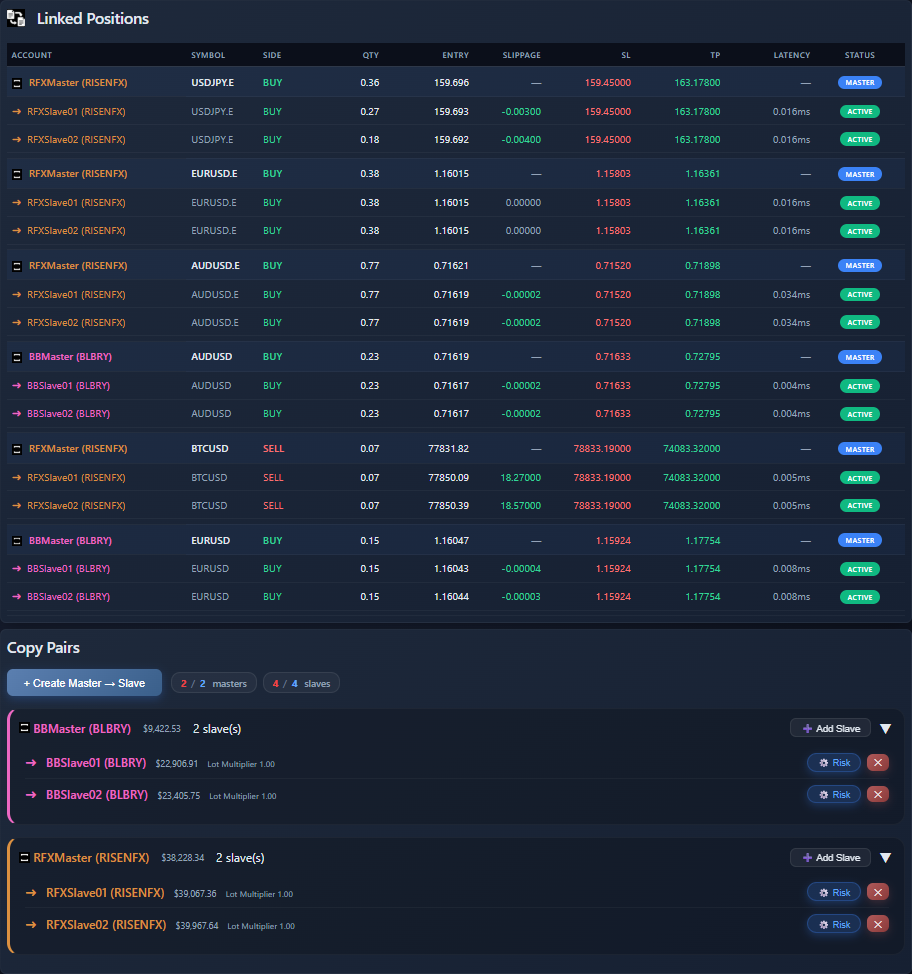
AlphaBridge Copier Dashboard – Copying tab with linked positions Actual Screenshot

Burst-Mode Parallel Execution

When your master opens a trade, AlphaBridge fires orders to every slave simultaneously, not one after another. All copies land within the same millisecond window, even with 4+ slaves.

Self-Healing & Crash Recovery

PC crashed? Power outage? Every linked position is stored locally. On reboot, the engine reconciles open positions, resolves pending orders with exponential backoff, and resumes exactly where it left off.

Cross-Server Symbol Translation

Copy between accounts on different TradeLocker servers. The engine builds proactive translation maps with fuzzy matching, so USDe ↔ USDX, BTCUSD.e ↔ BTCUSD, all handled automatically.

Adaptive Slippage Shield

The detection window scales automatically with your slave count: window = base + ⌈slaves × 0.5s⌉. Trades detected too late are skipped to protect you from excessive slippage.

Per-Pair Risk Control

Set lot multipliers or fixed lot sizes for each master–slave pair independently, with min/max guardrails. Scale prop challenges, balance account sizes, run aggressive and conservative strategies side by side.

Private & Secure by Design

Zero-knowledge architecture. Credentials are AES-256-GCM encrypted with a key derived from your hardware fingerprint. Trade data never leaves your machine. Our backend relays only signed control commands.

Extensive History Analytics

Every copied trade is recorded in a comprehensive History tab with 20+ performance metrics, interactive charts, slippage analytics, calendar heatmaps, per-pair breakdowns, and one-click CSV export. All in real time.

Outage Detection & Protection

If a TradeLocker server goes down, AlphaBridge detects the outage and automatically silences order placement, SL/TP sync, and position closing for that server, preventing failed-order storms.

Ultra-Light & VPS Ready

Under 8 MB on disk, under 10 MB RAM. Drop it on any free-tier VPS next to your broker's server — London, New York, Tokyo or Sydney, for minimal network latency at zero cost.

Native Trailing Stop Loss

Seamlessly mirrors TradeLocker's native Trailing Stop Loss (TSL) across all slave accounts. The engine continuously tracks and syncs trailing SL movements in real-time, ensuring your dynamic risk management is perfectly replicated.
📊 History Tab

Deep trade analytics, built in

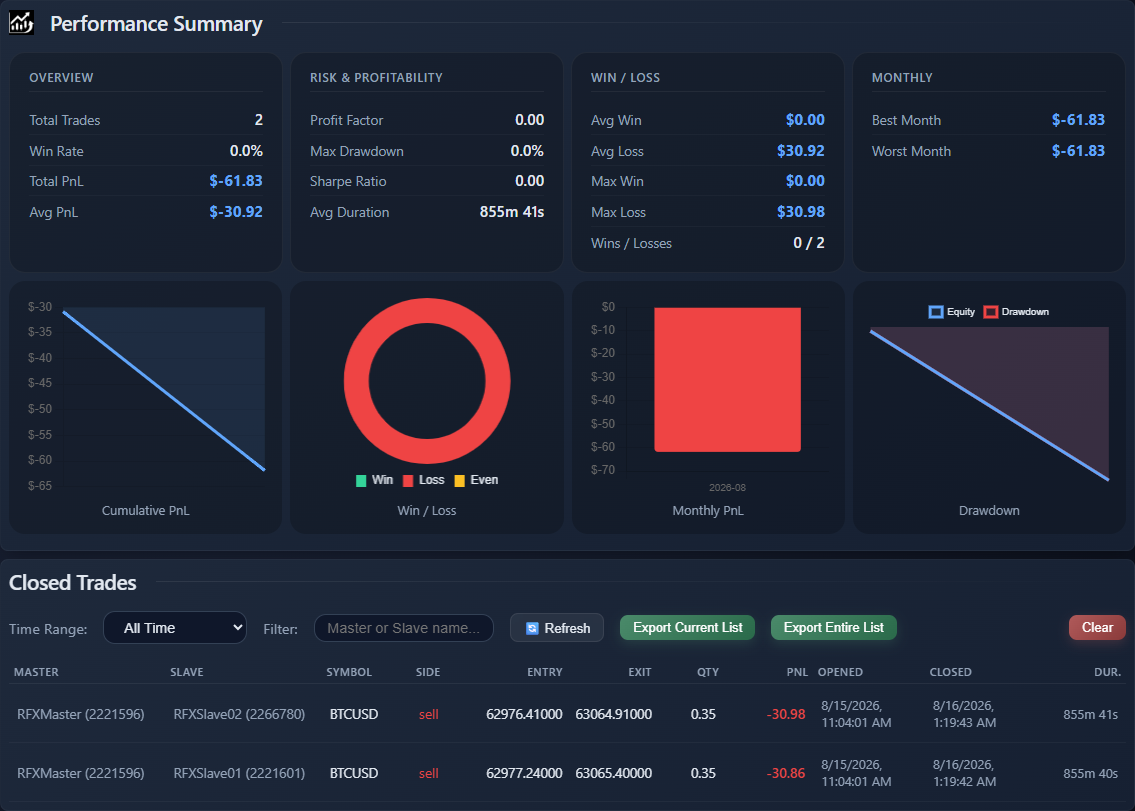
AlphaBridge doesn't just copy trades, it records, analyses, and visualises every single one. The History tab is a full performance analytics platform, updated in real time over WebSocket.

AlphaBridge Copier Dashboard – History tab with deep trade analytics Actual Screenshot

Performance Metrics Dashboard

Total trades, win rate, total & avg PnL, profit factor, max drawdown, Sharpe ratio, avg duration, avg win/loss, max win/loss, best/worst month — all computed live and grouped into Overview, Risk & Profitability, Win/Loss, and Monthly categories.

16 metrics

Win/Loss Streaks

Track your current streak, longest winning streak, and longest losing streak. Know exactly when your edge is hot or cold — and how long your best and worst runs have lasted.

Real-time

Interactive Charts

Five live charts: Equity Curve, PnL by Day of Week, PnL by Symbol, PnL Distribution histogram, and Trade Duration Distribution — all powered by Chart.js and updated automatically.

5 charts

Slippage Analytics

Average, worst, and best slippage per symbol. See exactly how many copies had favourable vs. unfavourable fills, with a per-symbol breakdown table and a full distribution histogram. Know where your latency edge is — and where it isn't.

Per-symbol

Daily P&L Calendar Heatmap

A 12-week GitHub-style heatmap showing every trading day colour-coded by profit or loss intensity. Hover any cell to see the exact P&L and trade count. Spot your best and worst days at a glance.

12 weeks

Per-Pair Performance

Win rate, total PnL, average PnL, and average duration broken down by each master→slave pair. Know exactly which copy combinations are profitable and which need tuning.

Per-pair

Filter, Sort & Export

Filter by time range (1h, 12h, 24h, 48h, all), custom date range, or account name. Sort any column. Paginate large histories. Export the current filtered view or the entire history as CSV with one click.

CSV export

Grouped Closed Trades Table

Every closed trade grouped by master position with slave rows underneath — showing instrument, entry/exit times, side, amount, entry/exit prices, SL/TP, P&L, duration, and position ID. Full 13-column sortable table.

13 columns

Real-Time WebSocket Updates

History isn't polled — it's pushed. When a slave position closes, the engine records it and streams the full trade record to your dashboard instantly via WebSocket. No refresh button needed.

Live push
Setup

Live in under four minutes

Simple setup, instant results. No coding, no configuration files, no headaches.

1

Sign Up

Choose your plan and create your account in seconds.

2

Setup Your Engine

Download and launch. Auto-registration links the engine to your account instantly.

3

Add TradeLocker Accounts

Enter credentials once — the engine fetches all your accounts automatically.

4

Set Master → Slave Pairs

Pick your pairs, tune risk per pair, and you're copying live.

🔧 Engineering

Under the hood

The details that separate a toy copier from a production-grade engine.

Rate Limit Intelligence

Reads TradeLocker's per-endpoint rate limits at startup and throttles every API category independently. Boosted limits for order placement, strict 1 req/s for everything else.

Strict Price Integrity

Closed-trade PnL uses only raw execution prices (rawAvgPrice / avgExecutedPrice). Never trigger prices, never fallbacks. Your PnL is always accurate.

Windows Tray Integration

Runs silently in your system tray with live status, heartbeat indicator, copy state, and one-click restart.

Granular Notifications

Toggle Engine, Copying, Critical, and Heartbeat notifications independently. Quiet mode silences everything except critical alerts. Settings persist across restarts.

Config Hot-Reload

Change copy pairs, risk settings, or slippage in the dashboard, the engine picks up changes instantly via file watcher. No restart needed. Ever.

Mobile Responsive Dashboard

The full dashboard works on your phone, bottom navigation, bottom-sheet modals, sticky table columns, and touch-optimised controls. Monitor your copies from anywhere.

Pricing

Plans that scale with you

Start small, upgrade as you grow. Every plan includes the full feature set — including the complete History analytics suite.

Trial
$0 / 7 days

Try everything, risk-free, before you commit.

  • 1 Master account
  • 1 Slave account
  • Full feature set
  • Real-time dashboard & analytics
  • Full History tab & CSV export
Start Free
Lite
$15 / month

A single master, copying to a small fleet.

  • 1 Master account
  • 2 Slave accounts
  • Per-pair risk control
  • Real-time dashboard & analytics
  • Full History tab & CSV export
Get Lite

30-day money-back guarantee. No questions asked.

⚠️ COMPLIANCE NOTICE: AlphaBridge Copier is strictly a technological software utility for automated trade execution. We DO NOT sell trading signals, provide financial advice, offer market analysis, or guarantee returns. We do not manage, hold, or have access to user funds. All trading decisions and risks are solely the responsibility of the user.

FAQ

Everything you need to know

All linked positions are stored in a local database. When you reboot, the engine automatically reconciles open positions, resolves any pending order links via TradeLocker's order history with exponential backoff retries, and resumes copying — no false positions, no manual intervention. Holding trades over the weekend? Shut down Friday, pick up Monday.

The History tab is a full performance analytics platform. It includes: 16 performance metrics (total trades, win rate, total/avg PnL, profit factor, max drawdown, Sharpe ratio, avg duration, avg win/loss, max win/loss, current/longest win/loss streaks, best/worst month), 5 interactive charts (equity curve, PnL by day of week, PnL by symbol, PnL distribution, trade duration distribution), slippage analytics (avg/worst/best per symbol, favourable vs. unfavourable fills, distribution histogram), a 12-week daily P&L calendar heatmap, per-pair performance breakdown, and a 13-column sortable closed trades table with time-range filtering, custom date ranges, account name search, pagination, and one-click CSV export of the current view or the entire history. Everything updates in real time over WebSocket.

When a new master position is detected, AlphaBridge builds order futures for every enabled slave simultaneously and fires them all at once using concurrent async execution. Every slave receives its order within the same millisecond window, regardless of how many slaves you have. This is fundamentally different from sequential copiers that process slaves one at a time.

Yes — this is one of AlphaBridge's most unique features. The engine builds proactive symbol translation maps between every pair of servers at startup. It uses exact matching first, then fuzzy matching that strips common suffixes (.e, X, PERP, SWAP, .c, etc.), so symbols like USDe ↔ USDX or BTCUSD.e ↔ BTCUSD are matched automatically. Both forward and reverse mappings are cached for instant lookup during copying.

The engine calculates a detection window based on your configuration: window = base delay + ⌈active slaves × 0.5s⌉. Any trade detected older than this window is skipped to protect you from excessive slippage. The window automatically scales with your slave count to ensure all copies are included. You can also disable it entirely if you prefer maximum coverage over slippage protection.

Absolutely. Your TradeLocker credentials are encrypted with AES-256-GCM using a key derived from your hardware fingerprint. Trade data never leaves your computer. Our backend only relays signed control commands and live telemetry over an encrypted WebSocket — we never store your API keys or trade history on our servers.

No. Your engine runs as a separate process on your machine or VPS, with a Windows system tray icon showing live status. The dashboard is purely for monitoring and configuration — close it anytime and copying continues uninterrupted.

Yes. AlphaBridge supports multi-master, multi-slave configurations with each pair handled independently and its own risk settings. On the Standard plan you can run up to 2 masters and 4 slaves, with up to 2 copy pairs per master. Accounts can even serve as both master and slave, supporting chained copying strategies.

Yes. The dashboard is fully responsive with a mobile-optimised layout: bottom navigation bar, bottom-sheet modals, sticky first column in tables, touch-friendly 44px+ tap targets, and dynamic viewport height support. Monitor your copies, check analytics, and manage settings from any phone or tablet.

Yes. AlphaBridge fully supports TradeLocker's native Trailing Stop Loss (TSL). The engine detects trailing SL orders, continuously monitors their movement, and synchronizes the updated stop-loss prices to all linked slave accounts in real-time. Your dynamic risk management is perfectly mirrored without any manual intervention.

Ready to stop babysitting your trades?

Join traders using AlphaBridge Copier for reliable, secure, lightning-fast copy trading with full analytics on every trade.

Start Your Free Trial Now →

Card required · 7-day full access · Cancel anytime